Registration Flow
Registration is the entry point: the user creates a FIDO credential (a Passkey or a hardware-token key pair), the public key is converted into a Decentralized Identifier, and that DID is registered with the cloud wallet so future credentials can be issued to it.
Sequence
Section titled “Sequence”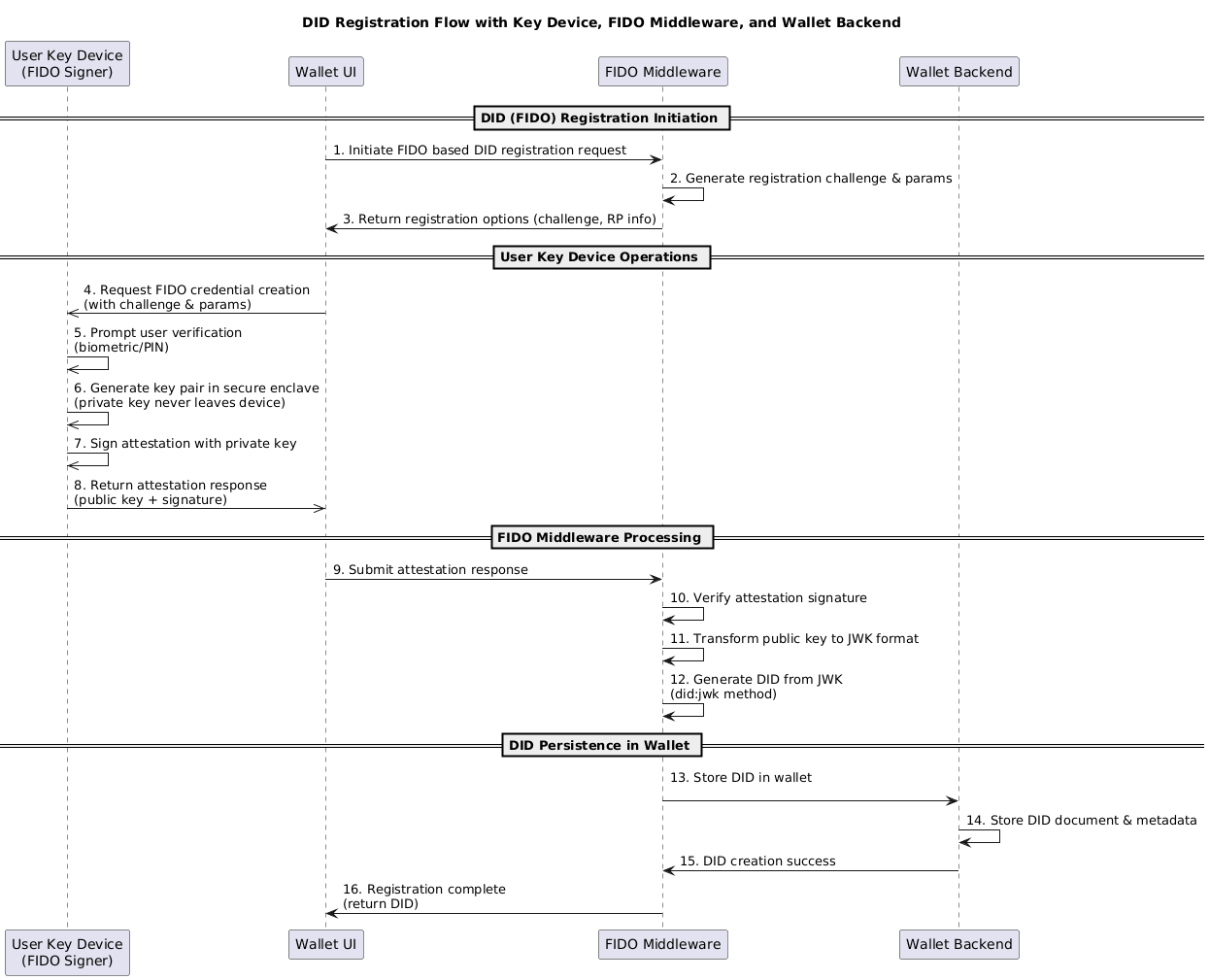
Phases
Section titled “Phases”The 16-step flow breaks into three phases.
Phase 1 — DID (FIDO) Registration Initiation (steps 1–3)
Section titled “Phase 1 — DID (FIDO) Registration Initiation (steps 1–3)”The user clicks “Add Key” in the Wallet UI and is prompted for an alias for the new credential. The UI calls the FIDO Middleware’s /register/start endpoint, which:
- Generates a fresh random challenge.
- Builds a
PublicKeyCredentialCreationOptionsobject — relying party info, supported algorithms (ES256 and RS256 by default), attestation policy, user verification requirement (required). - Stores the challenge in the session.
- Returns the options to the UI.
Phase 2 — User Key Device Operations (steps 4–8)
Section titled “Phase 2 — User Key Device Operations (steps 4–8)”The Wallet UI invokes navigator.credentials.create() with the registration options. The browser hands off to the platform / external authenticator, which:
- Validates the relying party parameters.
- Prompts the user for biometric or PIN verification.
- Generates an asymmetric key pair inside its secure element. The private key never leaves the device.
- Signs an attestation statement covering the public key and the registration challenge.
- Returns the attestation response (containing the public key, attestation, and signature) to the UI.
The UI forwards the attestation response to the FIDO Middleware’s /register/finish endpoint.
Phase 3 — FIDO Middleware Processing + DID Persistence (steps 9–16)
Section titled “Phase 3 — FIDO Middleware Processing + DID Persistence (steps 9–16)”The middleware:
- Verifies the attestation signature using
@simplewebauthn/server. Asserts the challenge and origin match. - Stores the WebAuthn credential record (credential ID, public key in COSE format, counter, transports) in its database.
- Converts the COSE public key to JWK format. For ES256, this means extracting the EC P-256 coordinates
xandyand emitting:{"kty":"EC","crv":"P-256","x":"<base64url>","y":"<base64url>","alg":"ES256"} - Generates a
did:jwkfrom the JWK:did:jwk:base64url(JCS(jwk)). This DID method embeds the entire JWK in the identifier and resolves deterministically without any registry. - Calls walt.id’s
/keys/importand/dids/createto register the key and DID with the wallet, binding them to the alias the user provided. - Returns the created DID to the UI.
The user now has a DID under their control, bound by FIDO to their authenticator, registered with the cloud wallet.
What the user did
Section titled “What the user did”From the user’s perspective, registration is two interactions: type an alias, then tap their face (or press a security key). The cryptographic operations — key generation, attestation, JWK conversion, DID creation, wallet registration — all happen in under 500 ms with no user-visible complexity.
What was created
Section titled “What was created”- On the user’s device: a FIDO credential (private key in secure element + credential ID).
- In the FIDO Middleware database: the WebAuthn credential record (public key, counter, transports, mapping to the user account).
- In the cloud wallet: a
did:jwkDID, bound to the alias, ready to receive credentials.
The DID’s verification material is the JWK encoded directly into the DID itself — a verifier doesn’t need to fetch anything to resolve it.
Key design choices
Section titled “Key design choices”did:jwk over other DID methods. No ledger, no DNS, no fetch — just base64url-decode the identifier. The DID is its own DID document. This matches FIDO’s offline-first philosophy.
ES256 as the default. P-256 ECDSA over SHA-256 is the FIDO2 baseline; nearly every authenticator supports it. RS256 is also accepted by default for compatibility with older security keys. Other algorithms can be added by extending the cryptosuite registry, but ES256 is the canonical case.
The middleware stores the WebAuthn credential record. Even though the DID embeds the public key, the middleware retains its own WebAuthn record (credential ID, counter, transports) because future authentication ceremonies need to call allowCredentials to indicate which credential to use. This is conventional WebAuthn server-side bookkeeping.
No attestation verification in production. The reference deployment uses attestationType: 'none' — sufficient for FIDO-bound DID provenance. Production deployments requiring attested authenticators (e.g., regulated environments) should switch to direct attestation and validate the chain against trusted root certificates.
What’s next
Section titled “What’s next”The DID is now usable as a credential subject. The user can receive credentials bound to it and later present them to verifiers.